WhatsApp BusinessRich Messaging at Scale
Engage customers with rich media messages, interactive buttons, and two-way conversations on the world's most popular messaging platform. Official Meta Business Partner.
Trusted by leading brands









Why Choose Zajel for WhatsApp Business
Rich Media Messaging
Send images, videos, documents, and location pins. Create interactive messages with buttons, lists, and product catalogs.
Interactive Elements
Drive action with quick reply buttons, call-to-action links, and interactive list messages that boost engagement by 3x.
Two-Way Conversations
Handle inbound messages, route conversations to agents or AI bots, and manage everything from a unified inbox.
Built for Performance
Everything you need to build world-class communication flows, engineered for scale and reliability.
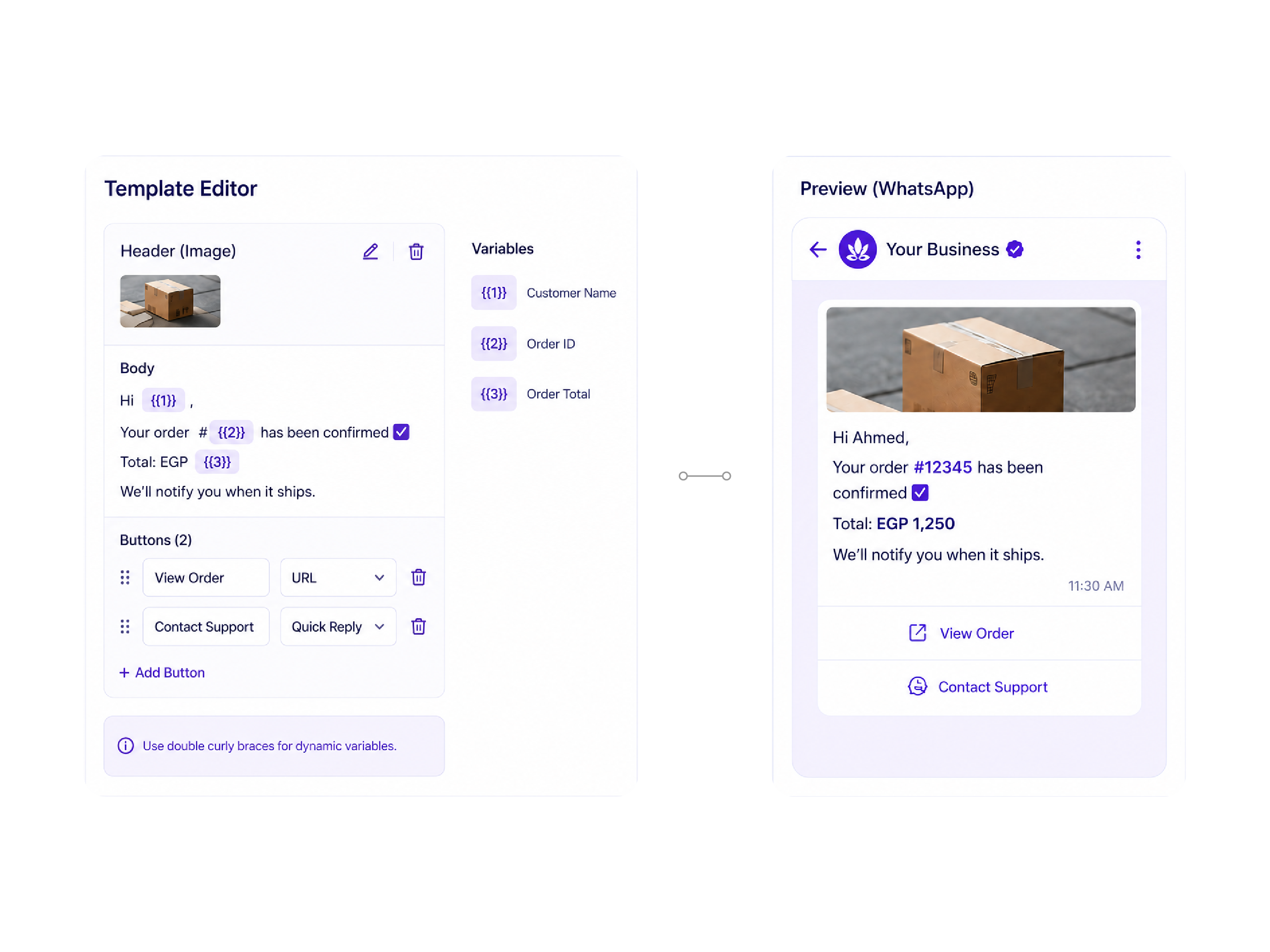
Template Messages
Create and manage WhatsApp-approved message templates with support for dynamic variables, rich media headers, and interactive elements. Our template management dashboard makes it easy to submit, track approval status, and organize all your templates in one place.
Catalog & Commerce
Showcase your products directly in WhatsApp with built-in catalog support. Customers can browse, ask questions, and complete purchases without ever leaving the conversation. Perfect for e-commerce and retail businesses.

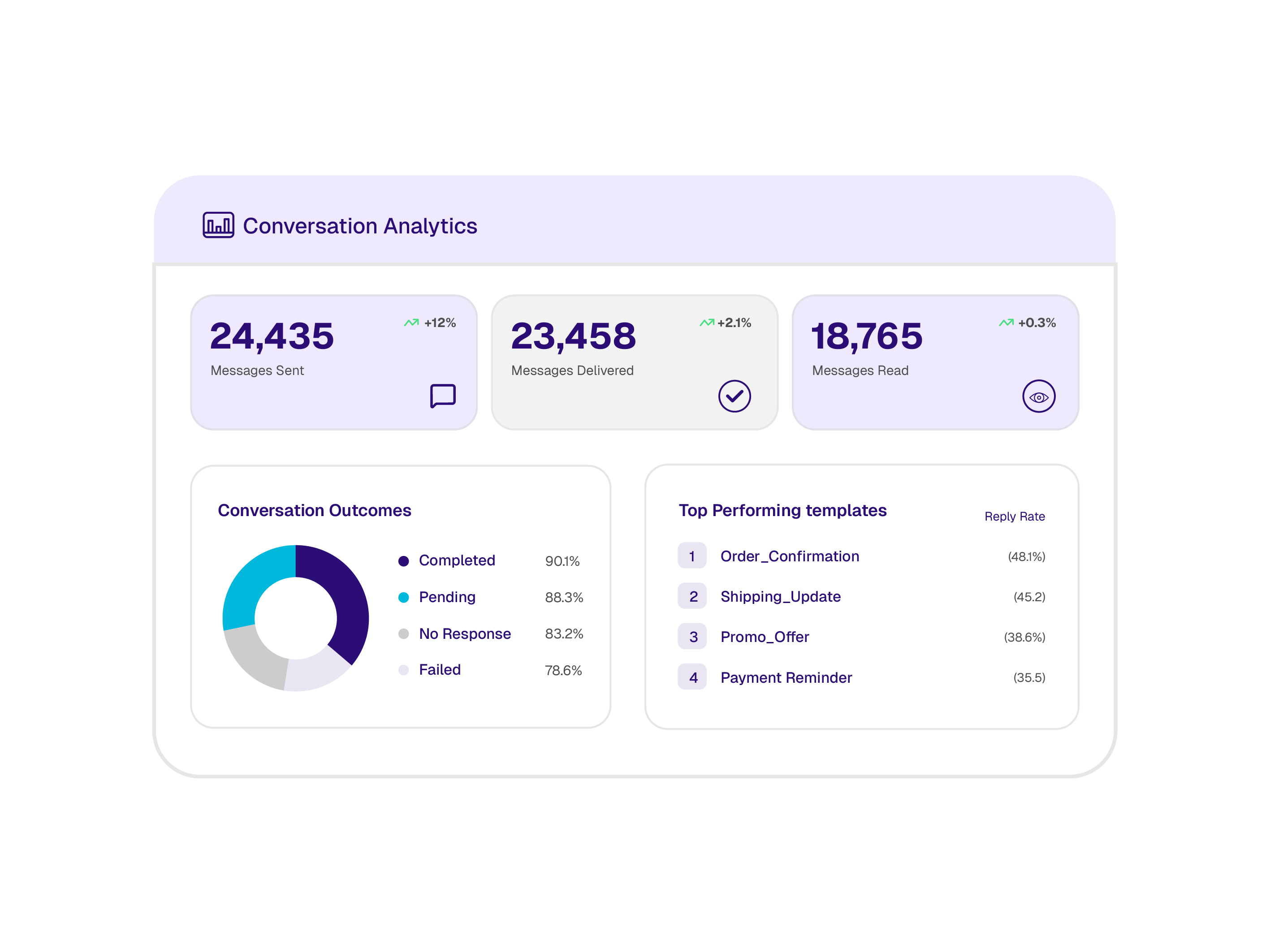
Conversation Analytics
Track message delivery, read rates, response times, and conversation outcomes. Understand which templates perform best and optimize your messaging strategy with data-driven insights.
How Businesses Use WhatsApp API
Discover how innovative teams are using WhatsApp Business to transform their operations, automate workflows, and drive growth.
Customer Support
Handle support queries with rich context, media sharing, and seamless agent handoff.
Order Updates
Send order confirmations, shipping updates, and delivery notifications with tracking links.
Marketing Campaigns
Broadcast promotions with 98% open rates using rich media templates and interactive CTAs.
Automated Flows
Build conversational journeys for lead qualification, appointment booking, and FAQ handling.
Integrate in Minutes
Robust, documented REST APIs and SDKs to seamlessly integrate WhatsApp Business into your stack.
#28c840]">"text-[#00b8db] font-semibold">import Zajel "text-[#00b8db] font-semibold">from '@zajel/sdk'; #28c840]">"text-[#00b8db] font-semibold">const client = new Zajel({ apiKey: 'your_api_key' }); #28c840]">"text-[#00b8db] font-semibold">const message = "text-[#00b8db] font-semibold">await client.whatsapp.send({ to: #28c840]">'+201234567890', template: #28c840]">'order_confirmation', language: #28c840]">'ar', components: [ { type: #28c840]">'body', parameters: [ { type: #28c840]">'text', text: 'ORD-4521' }, { type: #28c840]">'text', text: '15 Mar 2026' } ] } ]});WhatsApp API FAQ
Can't find what you're looking for? Contact our team
Start Messaging on WhatsApp Today
As an official Meta Business Partner, we'll get you set up in under 24 hours.